Intermittent fasting for iPhone, iPad & Apple Watch

See your fast, stage by stage.

Fast Track Pro times 16:8, 18:6, OMAD or a schedule you build, explains the window you’re probably in, and keeps your fast on your Lock Screen, Apple Watch and widgets.

7 days free on monthly and yearly plans, then $4.99/month or $24.99/year. Or pay once: $49.99. Cancel anytime in Settings.

  • Data Not Collected
  • No account
  • No ads
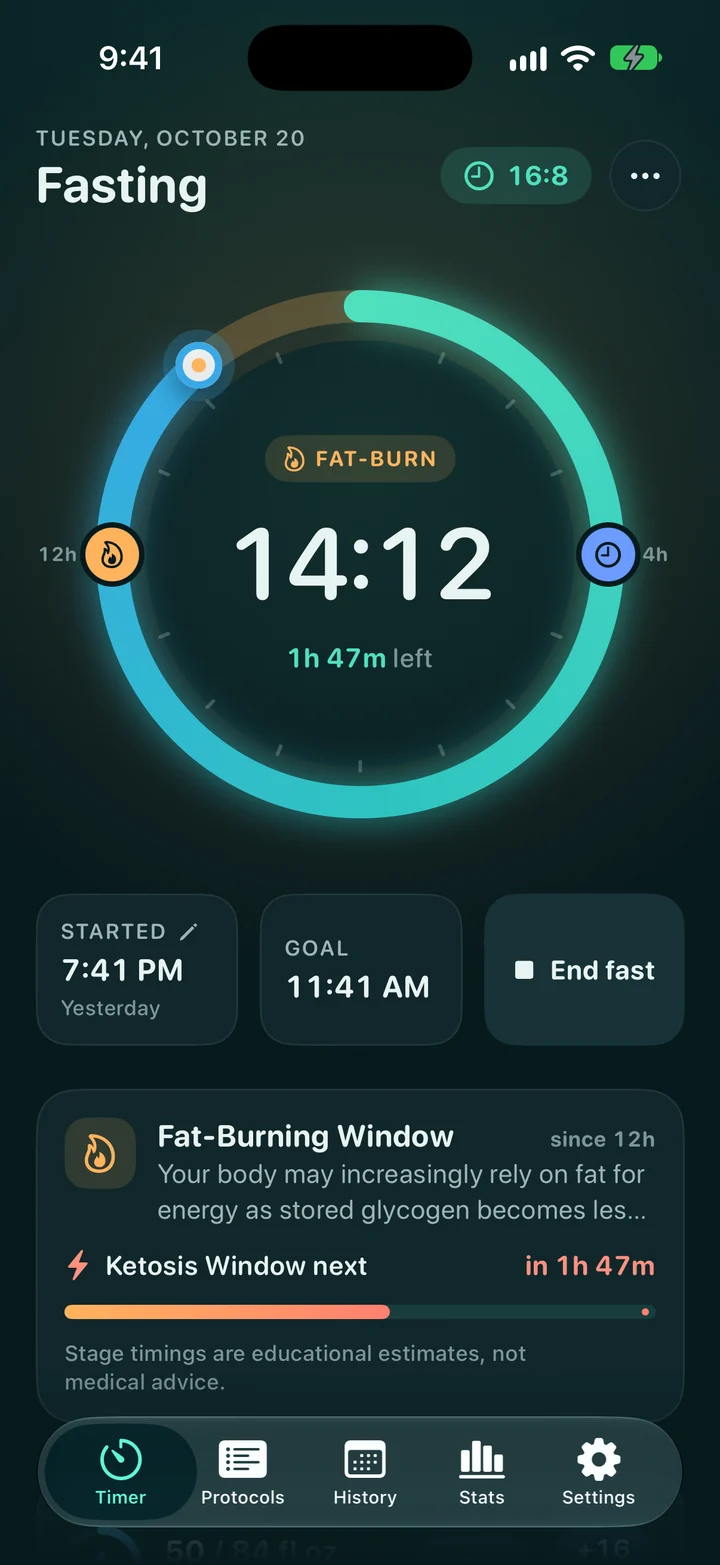
Fasting for 14:12:00 Fat-Burning Window Ketosis Window in 1h 48m

An example 14-hour fast. Stage timings are educational estimates.

Stats in Fast Track Pro: fasting hours by stage and a 39-day streak.
The Fast Track Pro timer during a 16:8 fast: 14 hours 12 minutes in, in the Fat-Burning Window, with 1 hour 47 minutes left.
Choosing a fasting plan in Fast Track Pro, from 16:8 to 20:4.

Fasting stages, explained

Know roughly where you are, honestly.

The app labels each part of your fast with a plain-language estimate, so the hours mean something. It never claims to measure what’s happening in your body.

  1. Fed Window

    Your body is likely still digesting food and using recently available energy.

    You’d be here
  2. Early Fasting

    Your body may begin shifting toward stored glycogen as the fasting window continues.

    You’d be here
  3. Fat-Burning Window

    Your body may increasingly rely on fat for energy as stored glycogen becomes less available.

    You’d be here
  4. Ketosis Window

    Some people may begin producing more ketones during this window.

    You’d be here
  5. Extended Ketosis

    Longer fasting windows may be associated with higher ketone production for some people.

    You’d be here
  6. Extended Fast

    Extended fasts are often discussed in relation to cellular cleanup processes, but timing varies widely.

    You’d be here

Stage timings are educational estimates. Everyone’s body is different, and Fast Track Pro doesn’t measure anything in your body. Not medical advice: talk to a healthcare professional before fasting, especially for longer fasts.

Features

Everything a fast needs. Nothing it doesn’t.

A calm, focused tracker that answers the questions you actually have mid-fast: how long, how far, and what’s next.

Plans

Start in one tap.

Pick a proven schedule or build your own, then start the timer. Pause, resume or end early whenever life happens.

  • 16:8
  • 18:6
  • 20:4
  • OMAD
  • 36-hour
  • Custom
  • Custom schedules with a fasting length and eating window you choose
  • Reminders when it’s time to start and when your fast is done
  • Hydration log with quick-add buttons right on the timer
Ready to fast: a 16:8 plan with a Start button and the eating window time left.
The fasting plan list, grouped from beginner to expert.

Insights & streaks

Watch your consistency grow.

Each day you finish a fast on goal counts toward your weekly goal, and your stats update on their own, so you can see what’s working without doing the math.

  • Streaks built on your weekly goal with weekly rest days and earned streak freezes, so a busy day doesn’t have to reset your progress
  • Achievements that unlock as you reach real milestones
  • Weekly insights with fasts, hours, average length and completion rate
  • A full history of every fast, including how it felt
Weekly insights: average fast length, fasts completed and hours fasted this week.
Achievements, with points earned and the next milestone.

Body & progress

Track weight and progress, privately.

Log your weight and see the trend next to your fasting history. Progress photos live in a private journal on your iPhone, and Fast Track Pro never uploads the images.

  • Weight and body-fat entries with an easy-to-read trend chart
  • Apple Health weight sync reads and saves weight and body-fat percentage, only if you allow it
  • Private photo journal with images the app never uploads
Weight trend chart with a goal line.
The private progress photo journal with a before and after comparison.

Everywhere you look

One fast, on every screen.

Start, check and end the same fast from wherever you are. Widgets and the Live Activity update to match, and your Apple Watch syncs with your iPhone when connected.

Roomy on iPad

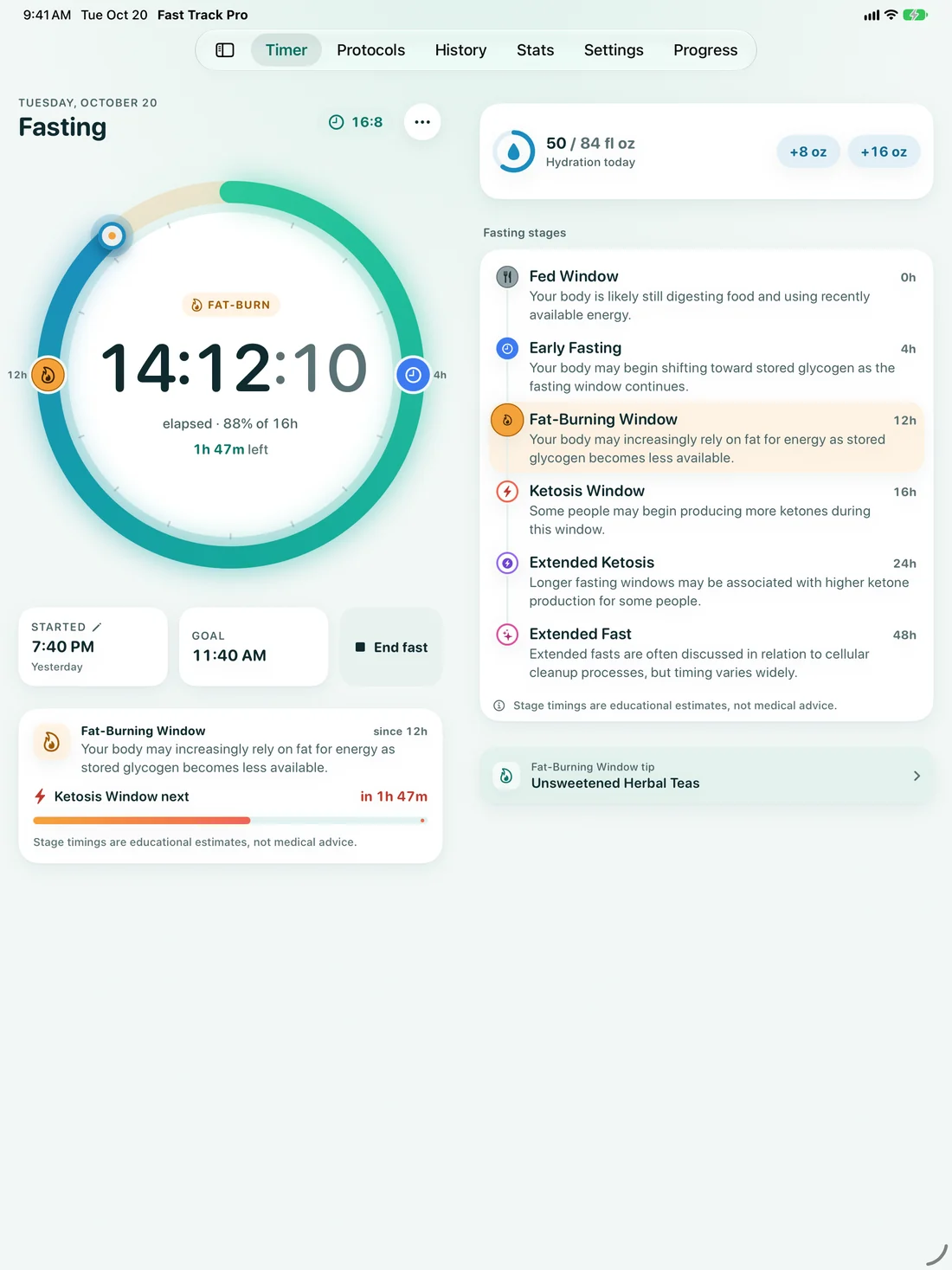
A big, glanceable ring with every stage beside it, plus stats and history with room to breathe.

The Fast Track Pro timer on iPad, with the fasting stages listed beside the ring.

Lock Screen & Dynamic Island

A Live Activity keeps your fast in view, and widgets start or end it with a tap.

  • Home Screen widgets
  • StandBy
  • Siri
  • Shortcuts

Apple Watch

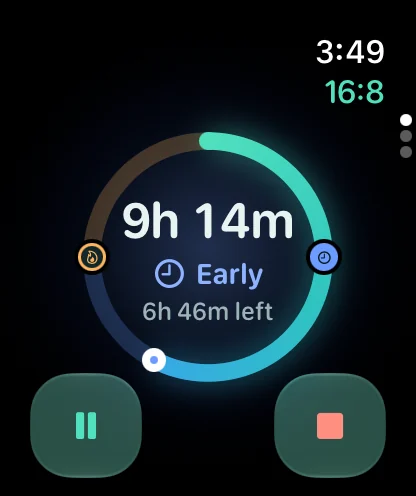
Start, pause and end fasts from your wrist, with complications for your watch face.

The fasting timer on Apple Watch, 9 hours 14 minutes into a 16:8 fast.
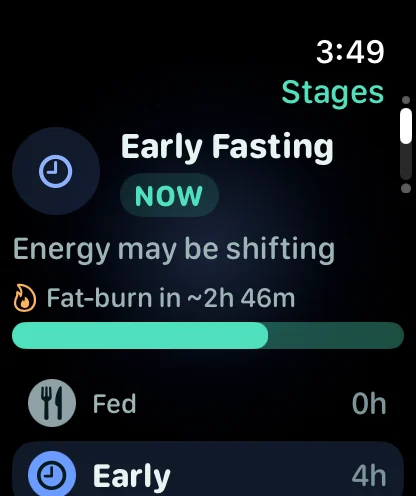
The current fasting stage estimate on Apple Watch.

Private by design

We collect nothing. Here’s where your data lives.

There’s no account to create, no server of ours, and no analytics, ads or trackers in the app or on this website.

App Store privacy label

Data Not Collected

The developer doesn’t collect any data from this app. Your fasts stay yours.

Read the privacy policy

On your device

Fasts, weight, water, notes and photos are stored on your iPhone. Only your own Apple Watch and widgets see your current fast, and the app never uploads your photo images.

Your private iCloud, if you want it

iCloud Backup & Sync is optional and off by default. When on, your records go to your own iCloud account, which we can’t access. Progress photo images are never uploaded.

Apple Health, only if you allow it

Fast Track Pro can read and save weight and body-fat percentage. You choose, and you can change it any time in the Health app.

See it in action

One fast, start to finish.

7:41 PM to lunch in 24 seconds, every frame the real timer. With voiceover and captions; loads only when you press play.
The portrait cut.

Pricing

Try it free for 7 days.

Monthly and yearly plans start with a 7-day free trial for new subscribers, and if notifications are on, the app reminds you about 2 days before it ends. Or pay once and keep it. Every plan unlocks everything.

Lifetime

$49.99once

One purchase. No subscription.

  • Full access to every feature
  • No renewals, ever
  • No free trial on this option
Get lifetime access

Every plan includes

  • All fasting plans and custom schedules
  • Fasting-stage estimates and timeline
  • Apple Watch app that syncs with your iPhone
  • Widgets, Live Activity, Siri and Shortcuts
  • Weekly goal, streaks, rest days and freezes
  • Achievements, stats and weekly insights
  • Weight, hydration and photo journal
  • Optional Apple Health and iCloud sync
  • Reminders, fasting alerts and data export

Prices shown in US dollars; your local price appears in the App Store before you buy. Fast Track Pro requires a subscription or the lifetime purchase to use after the free trial. The 7-day free trial is for eligible new subscribers to the monthly or yearly plan. Payment is charged to your Apple ID when you confirm the purchase or, with a trial, when the trial ends. Subscriptions renew automatically unless canceled at least 24 hours before the end of the current period, and your account is charged for renewal within the 24 hours before the period ends. Manage or cancel in your Apple ID subscription settings. Any unused part of a free trial ends when you buy a subscription.

See the Terms of Use and Privacy Policy.

FAQ

Questions, answered.

Is there a free version?

Fast Track Pro is a paid app with a free trial. New subscribers get 7 days free on the monthly or yearly plan. After the trial, a subscription or the one-time lifetime purchase is needed to keep using the app. If you allow notifications, the app reminds you about 2 days before your trial ends. Cancel at least 24 hours before the trial ends and you won’t be charged.

Does it work with Apple Watch?

Yes. The Apple Watch app shows your timer and current stage estimate, lets you start, pause and end a fast from your wrist, and adds complications to your watch face. It syncs with your iPhone when they’re connected, so a fast started on one shows on the other. It needs watchOS 10 or later.

Do I need an account?

No. There’s no sign-up and no login. Open the app, choose a plan and start your fast. Purchases go through your Apple ID on the App Store.

What data do you collect?

None. Fast Track Pro’s App Store privacy label is “Data Not Collected.” Your fasts, weight, water and photos are stored on your device, and in your own private iCloud only if you turn on iCloud Backup & Sync (photo images are never uploaded, even then). There are no analytics, ads or trackers, and we don’t run a server that receives your data.

Can I sync between my devices?

You can turn on iCloud Backup & Sync in the app’s Settings to keep your fasting history, weight, water and settings in your own private iCloud. It’s off by default. Progress photo images aren’t part of it: they stay on the device where you added them and are never sent to us, though, like other app files, they’re included in your device’s own iCloud or computer backup. With sync on, only each photo’s journal details, such as its date, weight, notes and category, sync with your other records. You can also export your history as a file at any time.

How do I cancel or restore a purchase?

To cancel, open the Settings app on your iPhone, tap your name, then Subscriptions, then Fast Track Pro. To restore on a new device, sign in with the same Apple ID, open Fast Track Pro and tap Restore Purchases on the subscription screen.

Which fasting plans are included?

16:8, 18:6, 20:4, OMAD (one meal a day) and a 36-hour fast, plus custom schedules where you choose how long to fast and how long to eat.

Is this medical advice?

No. Fast Track Pro is a wellness and education app, not a medical device. Fasting-stage timings are estimates and vary from person to person. Talk to a healthcare professional before fasting, especially if you are pregnant or breastfeeding, under 18, have diabetes or another medical condition, take medication, or have a history of disordered eating.

More answers in the Help Center.

Start your first fast tonight.

Pick a plan, tap start, and let Fast Track Pro keep count. Free for 7 days on monthly and yearly plans.

Download on the App Store

Requires iOS 17 or later. Apple Watch app requires watchOS 10 or later.